Wireshark analysis of a STRRAT infection: You Dirty Rat! exercise
At a glance
- Tools: Wireshark
- Lab: You Dirty Rat!, Malware Traffic Analysis.net (July 30, 2024)
- Objective: Identify the infected host, determine what malware was present, understand how it was communicating, and produce a formal incident report
- Outcome: Identified STRRAT infected workstation belonging to user ccollier; confirmed active C2 beaconing to a Lithuanian hosting server every 5 seconds; discovered Base64 encoded file activity exfiltration in the TCP stream
Overview
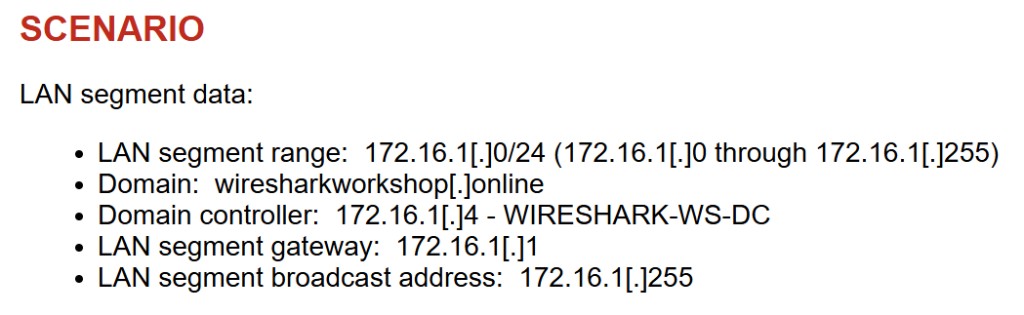
This project is a network forensics investigation using Wireshark. I analyzed a PCAP file from the Malware Traffic Analysis.net training exercise “You Dirty Rat!”, a simulated enterprise network scenario where one machine on the LAN had been infected with malware. The goal was to identify the infected host, determine what malware was present, understand how it was communicating, and document everything in a formal incident report.
The network was a Windows Active Directory environment on the wiresharkworkshop.online domain with a /24 LAN segment and a domain controller at 172.16.1.4.

Approach
I started by identifying suspicious connections using the Conversations view, then filtered by the suspect IP to analyze the traffic directly. I followed the TCP stream to read the beacon data, used Kerberos packets to confirm the victim’s hostname and username, and dug deeper into the stream to look for evidence of activity beyond basic beaconing.
Findings
Step 1: Identifying the suspect host
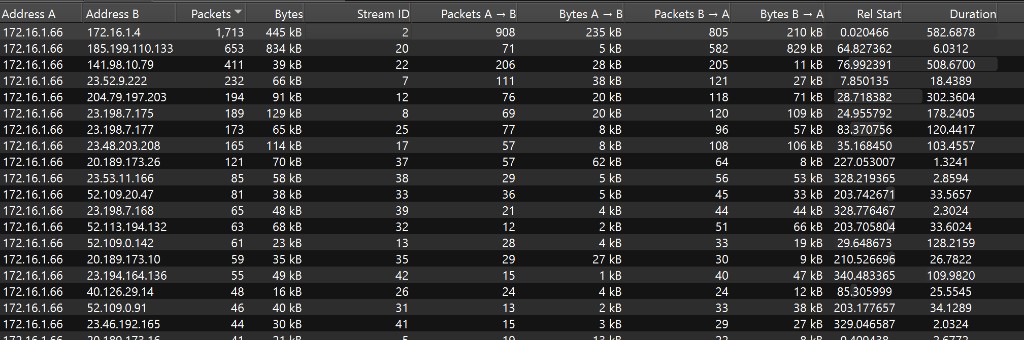
Using Statistics → Conversations filtered to IPv4 and sorted by bytes, every single conversation in the capture originated from one internal host (172.16.1.66), making it the clear focus of the investigation. Most of its external connections were short lived and pointed to recognizable infrastructure. One entry stood out immediately: a connection to 141.98.10.79 with 411 packets and a duration of over 508 seconds. There was no obvious reason for a workstation to maintain a connection that long to an external server.
Step 2: OSINT on the suspicious IP
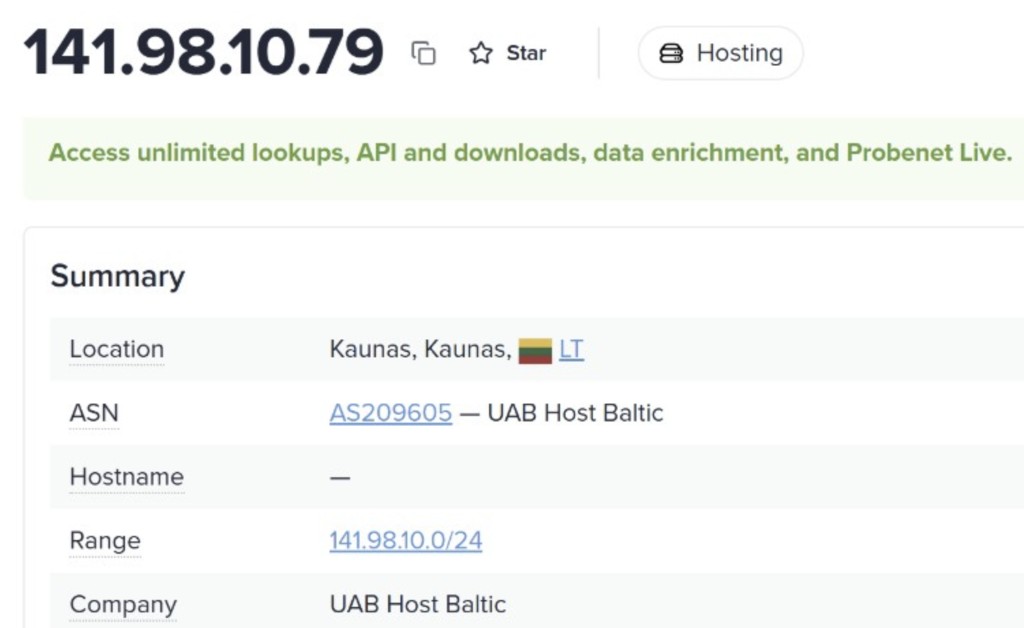
Looking up 141.98.10.79 on ipinfo.io revealed it belonged to UAB Host Baltic, a generic hosting provider in Kaunas, Lithuania with no hosted domains and no hostname. A small business workstation maintaining a 508 second connection to an anonymous foreign hosting server with zero associated domains has no legitimate explanation. This made it the primary suspect for a C2 server.
Step 3: Analyzing the connection
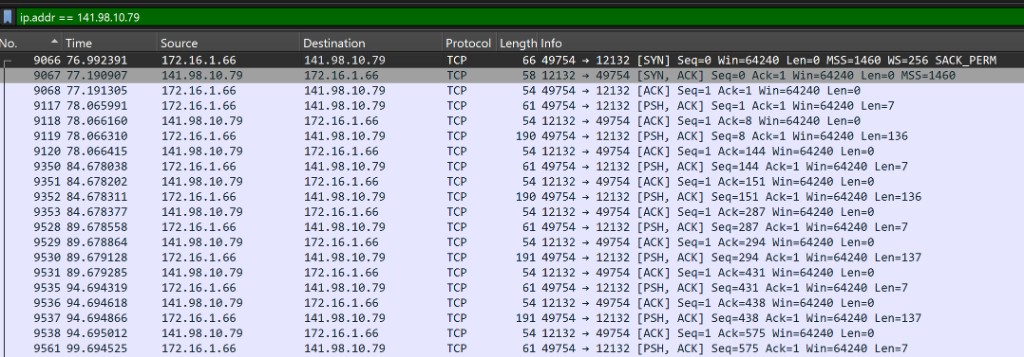
Filtering for ip.addr == 141.98.10.79 showed the traffic was labeled as plain TCP on port 12132. Wireshark did not recognize it as any known protocol, suggesting the malware was using a custom communication channel to avoid detection. The packets also arrived at a perfectly regular interval of approximately 5 seconds, consistent with malware beaconing, where the infected machine repeatedly checks in with a command and control server waiting for instructions.
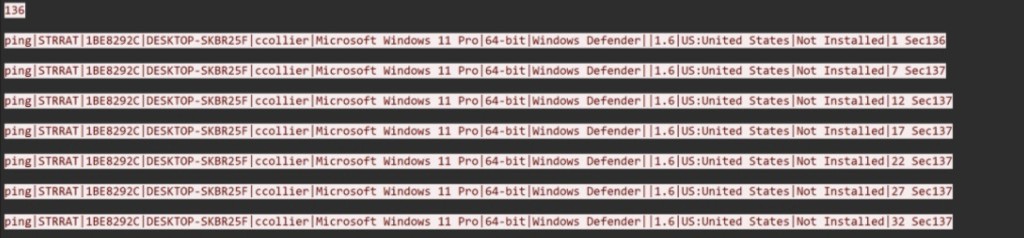
Following the TCP stream confirmed everything. The stream was completely readable plain text and every beacon followed the same structure. Each beacon exposed the malware name (STRRAT), a unique infection ID, the hostname, the Windows username, OS version, antivirus status, and geolocation, all transmitted to the attacker in plain text every 5 seconds. The traffic was completely unencrypted, making the beacon contents directly readable without any decryption.
Step 4: Identifying the victim
To confirm the victim’s full details I filtered Kerberos authentication traffic using kerberos && ip.src == 172.16.1.66. Inside a Kerberos AS-REQ packet the CNameString field revealed the Windows username ccollier, and the Ethernet header of the same packet provided the MAC address 00:1e:64:ec:f3:08. The hostname DESKTOP SKBR25F was visible in the Kerberos addresses field.
Step 5: Deeper stream analysis
Going further into the TCP stream revealed the beacons changed behavior later in the session. Two things appeared that were not in the early beacons:
First, the status field changed from blank to “Not Idle”, indicating STRRAT detected active user activity on the machine.
Second, the beacon data began including Base64 encoded strings. I copied each one into CyberChef using a From Base64 recipe to decode them:
| Base64 (stream) | Decoded value | |
|---|---|---|
SG9tZQ== |
Home | |
RG9jdW1lbnRz |
Documents | |
cG91bmRzLWZvcm11bGEgW0NvbXBhdGliaWxpdHkgTW9kZV0gLSBQb3dlclBvaW50 |
pounds formula [Compatibility Mode] PowerPoint |
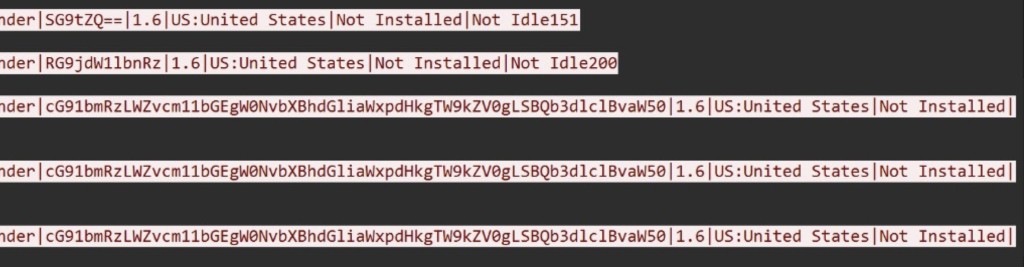
These values represent folder names and an open file, consistent with STRRAT monitoring and reporting the victim’s active file usage back to the C2 server. Since there was no data coming back from the C2 server in the stream, this appears to be automated surveillance rather than an attacker actively browsing the machine in real time.
Incident report
Executive summary
On July 30, 2024, workstation DESKTOP SKBR25F on the wiresharkworkshop.online domain was confirmed infected with STRRAT, a Remote Access Trojan active since 2020. The malware established a persistent connection to a command and control server in Lithuania (141.98.10.79) and beaconed every 5 seconds, transmitting full system details to the attacker in unencrypted plain text. Later in the session the malware began reporting Base64 encoded file activity, including folder names and an open PowerPoint file from the victim’s session. The infected host should be isolated immediately and reimaged. All credentials associated with the ccollier account should be considered compromised and reset.
Victim details
| Field | Value |
|---|---|
| IP Address | 172.16.1.66 |
| MAC Address | 00:1e:64:ec:f3:08 |
| Hostname | DESKTOP SKBR25F |
| Domain | wiresharkworkshop.online |
| Username | ccollier |
| Operating System | Microsoft Windows 11 Pro 64 bit |
Indicators of compromise
| Type | Value | Notes |
|---|---|---|
| IP Address | 141.98.10.79 | C2 server, UAB Host Baltic, Kaunas Lithuania, port 12132 |
| Domain | ip-api.com | Geolocation lookup performed by malware on infection |
| Malware | STRRAT | Remote Access Trojan, infection ID 1BE8292C |
| Behavior | 5 second beaconing | Custom TCP protocol, plain text exfiltration |
| Exfiltrated data | Home, Documents, pounds formula [Compatibility Mode] | Base64 encoded file activity reported to C2, decoded with CyberChef |
Note: No SHA256 hash is included because no malware binary was extracted from this PCAP. The exercise allows hashes when objects from the capture support them.
Conclusion
The main takeaway from this lab was the importance of starting broad before going narrow. Conversations first to find the outlier, OSINT on the suspect IP, then filtering and following the stream to confirm. The same order that made the investigation logical also made the incident report straightforward to fill in; each step fed directly into the executive summary, victim table, and IOC table the exercise required.
Exercise source: Malware Traffic Analysis.net, You Dirty Rat! (July 30, 2024)